He asked for a payment tracker. He needed a student view.
A jiu-jitsu coach wanted an easier way to check payments. Underneath it was a bigger need: one place for four coaches to see everything about 300+ students.
A jiu-jitsu coach asked me for an easier way to check which students had paid. By the time we’d finished talking, the real need was much bigger: one place where all four coaches could see everything about every student. This is how a daily payment chore turned into an app, and why the most useful part of the work happened before any code was written.
The question
For the last six months I’ve been training in Jiu-Jitsu, a martial art that’s a lot like wrestling. Recently one of my coaches came to me with a problem, and it had nothing to do with technique.
The academy has two branches, four coaches and more than 300 students across different batches. Every month the students get a payment link, but they don’t all pay at once. Some pay the same day and some a few days later, so every single day the coaches go into the payment portal, search for each student, check whether the payment has come in and then update their own notes.
One coach told me this takes him 30 minutes to an hour a day. Another coach, who’s more comfortable with technology, still spends around 15 minutes on it every day.
His question was simple: is there an easier way to search for a student and see what I need? And then a second one: can the payment update automatically when the student pays?
The first fix was Excel
My first thought wasn’t to build an application. I started small, with an Excel file where the payment export could be added and matched against the student list, so every student got one clear next step: paid, pending, overdue and needs chasing, payment link not sent yet, or on a break. Anyone still waiting after seven days gets flagged to chase.
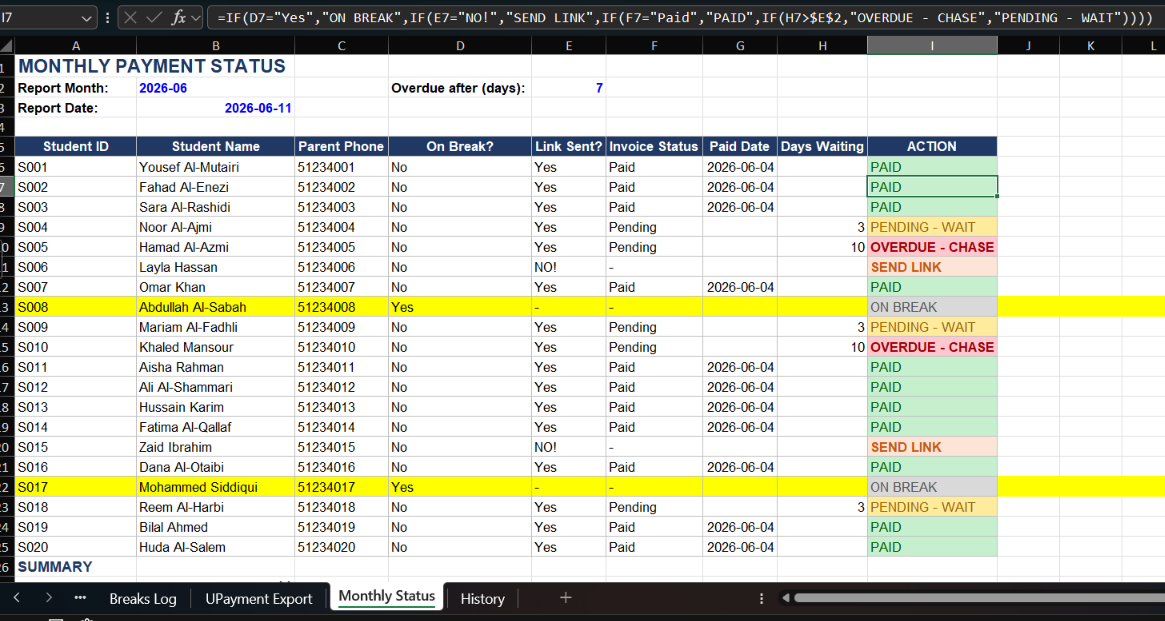
It worked, but when I showed it to the coaches it didn’t fit how they work. They wanted to search for a student quickly, and they wanted one file that all four coaches could use. They don’t use OneDrive or any shared cloud storage, so a single Excel file wasn’t going to work. I had Google Sheets in mind as a backup, but the question about payments updating automatically came up again, and a spreadsheet was never going to do that well.
The real problem was bigger than payments
The turning point came during a demo with another coach. For him, payments were only one part of it. Which belt each student is on and which championships they’ve competed in currently lives in his head or in his notes. Add the questions the coaches already had, like who’s taking a break or which siblings pay a different fee, and the picture changes.
He also told me they’d tried to solve this before. Two years ago they asked a company to build a full system, with its own payments plus student records, belts and more, and the quote came back at 800 KWD. Then new rules in Kuwait required payments to go through recognised platforms like UPayment, and since their plan depended on its own payment system, they dropped the whole thing and the manual routine stayed. This time I didn’t need to replace anything, because the app works alongside UPayment instead of competing with it.
That’s when it became clear they didn’t need a payment tracker. They needed what the data world would call a single customer view, or in this case a single student view: one place to see who a student is, which batch and coach they belong to, whether they’re active or on a break, what they pay and when they last paid.
The coaches never used those words, and they didn’t need to. Their job was to explain the problem, and my job was to understand what was underneath it.
From a spreadsheet to an application
So instead of stopping at Excel, I built one application where the coaches log in and find everything about a student.
60-second walkthrough. All student details shown are sample data.
A coach who wants to mark a payment by hand can still do that. If they’d rather export the payment report and import it, that works too, and later the payment platform can be connected directly so payments update on their own. Beyond payments, each student has a history covering their batch, coach, breaks, status and fee. Belt progression, competitions and reminders can come later, once the basics are being used every day.
I didn’t want to build everything at once. I wanted the right foundation, with real data, and to grow it from what the coaches actually use.
How AI fit in
I also used this project to try a different way of building. I write the requirements, business rules and expected behaviour, one AI tool builds, a second one reviews the work and questions the logic, and then I do the final review myself:
I define the rules → Codex builds → Claude Code reviews → I review
AI helped me move much faster. But it didn’t speak to the coaches, it didn’t notice that a payment question was really a student view question, and it didn’t decide what the users needed. That part still starts with understanding the business. I’ll write about the build itself in the next post.
What I’d tell anyone thinking of building something like this
I’ve spent 12 years doing this kind of work in retail, across thousands of stores, and it turns out the job is the same at a 300-student academy: the most valuable work happens in the conversation, before any code is written.
AI has made the building part far easier than it used to be, and that’s exactly why it’s worth starting with a real problem. Find someone doing the same task by hand every day, listen until you understand what’s underneath it, and then build. The tools will help with the rest.
The coaches are testing it now, and it goes live with the academy’s real data this week.
← Back to Projects