The Data Cleansing Master Tool: 2.5 days of work, done in under 3 minutes
An in-house Excel, VBA and Power BI tool that automated 400+ data quality rules, replaced a six-figure platform, saved 109,406 KWD, and earned a CTO award.
At Alshaya, cleansing a single dataset by hand took about 2.5 days. I built an in-house Excel and VBA tool that does the same work in under 3 minutes. It runs more than 400 data quality rules, removed the need for a six-figure external platform (saving 109,406 KWD), and contributed to a CTO Award for Exceptional Business Contribution in 2024.
The problem
The tool was born during a major data migration, when several constraints landed at the same time:
- No cleansing tool on hand. Our migration partner did not have the data cleansing capability we needed.
- A tight budget. A premium platform like Informatica CDQ was out of reach on cost, so we needed something affordable but genuinely effective.
- A tight timeline. Leadership wanted a fast, honest read on the quality of our existing data.
- Heavy manual effort. Finding and fixing issues by hand was slow and error-prone.
- An Excel-first culture. The business teams lived in Excel, so whatever I built had to meet them there.
How I built it
I had two design goals: powerful enough to replace the manual work, and simple enough that a business user could run it with no training.
The tool is VBA-based and runs inside Excel. Everything is driven from a Config sheet: workbook names, column names, and the rule details all live there, so a user can point it at new data and set the rules without touching any code.
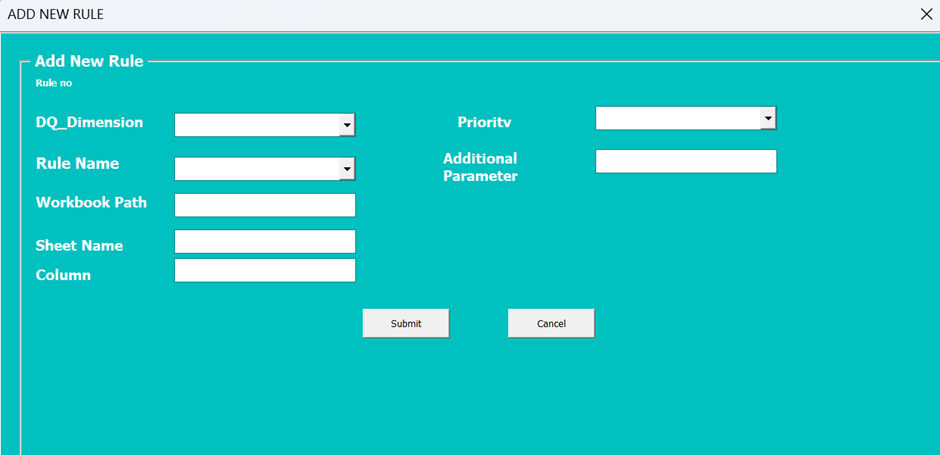
Under the hood it runs more than 400 checks across the data quality dimensions that matter: completeness, validity, uniqueness, consistency, and format. The rules range from the basic (null values, junk characters, valid-value lists, length checks) to the advanced (valid email, valid phone number, valid date, duplicate detection, and wildcard matching).
See it in action
What changed
The numbers are what made this land:
- 2.5 days to under 3 minutes per dataset, a 99% cut in processing time.
- 109,406 KWD saved by building in-house instead of buying Informatica.
- 400+ rules, fully in-house, with no vendor dependency and full control over the logic.
- A visual priority system. Every flagged item is colour-coded by urgency, red for high, orange for medium, yellow for low, and carries a validation message telling the user exactly what to fix.
This work contributed to the CTO Award for Exceptional Business Contribution in 2024.
Reporting and analytics
The cleansing output feeds straight into Power BI dashboards, giving management a continuous, at-a-glance view of data quality across every dimension.
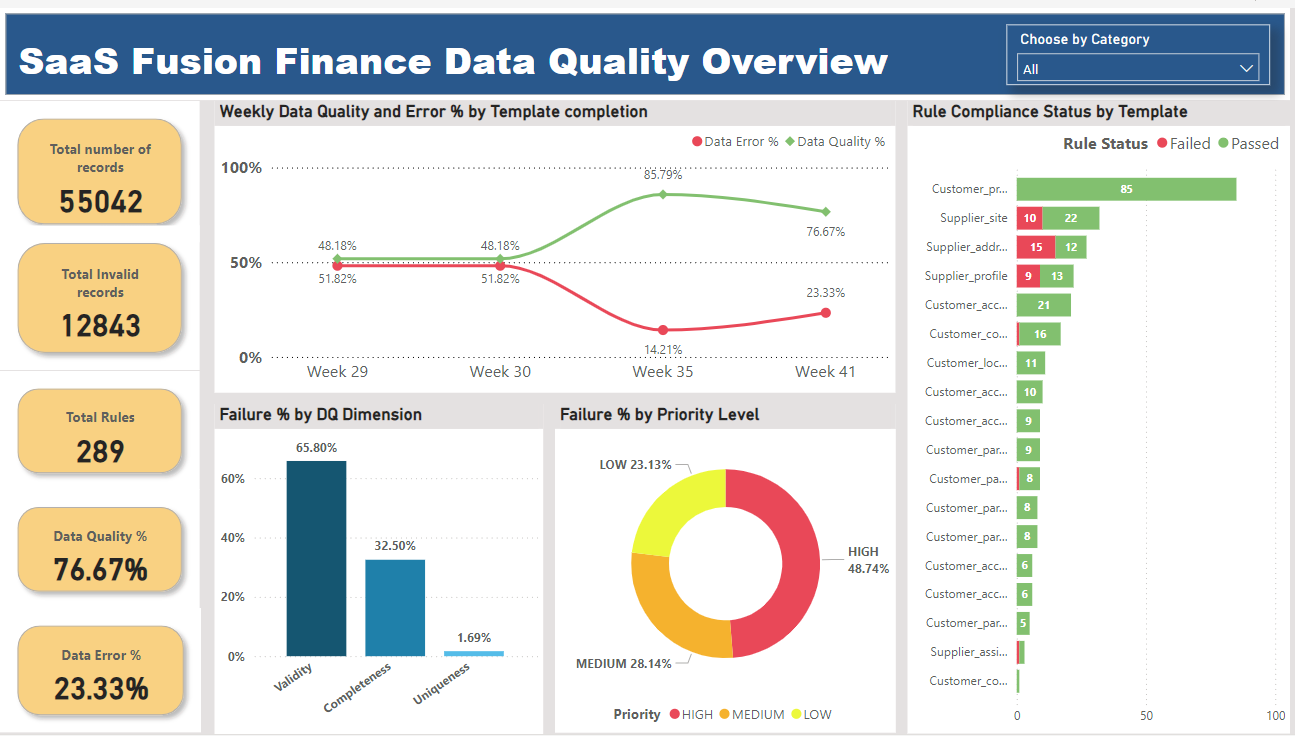
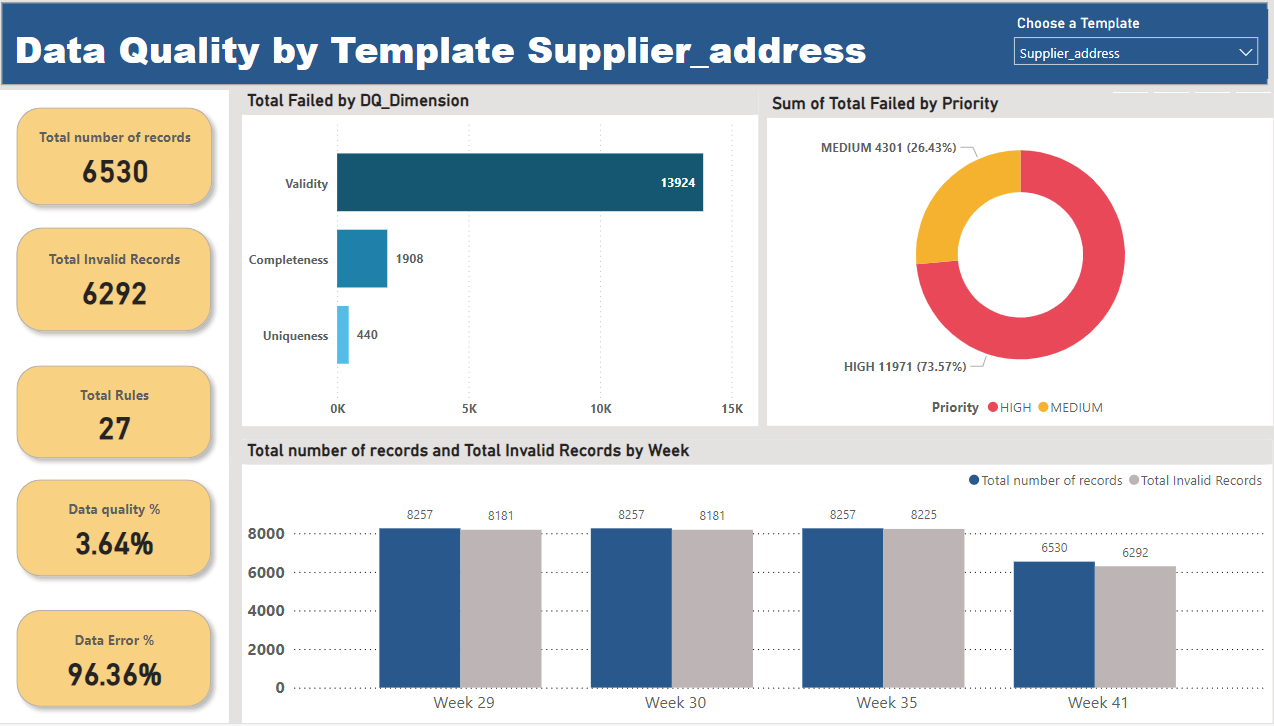
The dashboards turn raw checks into interactive visuals, so teams can spot issues quickly and track improvement over time.
What I would tell another analyst
When a premium tool is out of reach, treat the constraint as a gift. Building in-house forced me to get clear on exactly which rules mattered, and that clarity made the tool better than an off-the-shelf product would have been.
Two things carried the whole project. First, meet people where they already work. The best tool is the one people actually use, and for these teams that meant Excel. Second, drive everything from configuration rather than code, so the tool scales to new data without needing you in the loop.
If you are facing a similar data quality problem and want to build something like this, feel free to reach out. I am always happy to talk through the approach and guide you on how it can be done. You will find me on LinkedIn.
← Back to Projects